
What Does Collate Mean When Printing?
If you have used the “print” button in a document and seen an option called “collate,” chances are that you have wondered what it does. It appears to be nothing more than a box to check, but it might entirely alter your final output when printing.
What does it mean to collate while printing? This information is especially valuable to know if you often need to print any number of reports, books, or any other document where order matters.
In this guide, we will explain what collating means and what you need to know about it in a clear and easily understandable way.
At its most basic level, what does collate mean when printing pertains to how your pages get arranged while printing multiple copies of the same document.
Simple Definition:
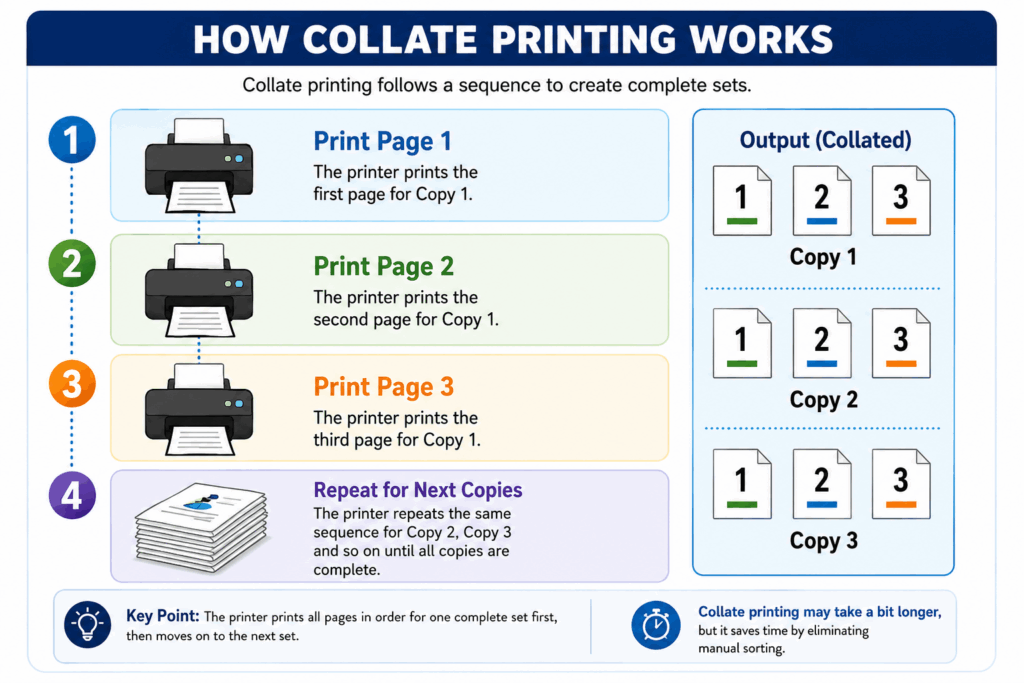
Collation means printing the pages in an entire series order sequence, as compared to identical page grouping.
Thus, instead of printing all the pages one, then all pages two, then all pages three, the printer prints complete copies in the form of:
- Copy one: Page one → Page two → Page three
- Copy two: Page one → Page two → Page three
- Copy three: Page one → Page two → Page three
This is precisely what one calls when asking for what collated printing is or what it means to collate when printing.
Collate Meaning in Printing: Explanation
“Collate printer meaning” can be described simply as an automated process of arranging printed sheets systematically.
For instance, when you print several copies of the same document:
- Collate = ON -> You will receive a document in sequence
- Collate = OFF -> You will have groups of pages according to numbering
In other words, the printer becomes:
- “Binder” in the case of collate,
- Or “Page duplicator” without collate
This simple distinction is the foundation of the collate printing definition in all printing environments.
Collated vs Uncollated: The Core Difference
Understanding collated vs uncollated is the most important part of mastering printing settings.
Side-by-Side Comparison
| Feature | Collated Printing | Uncollated Printing |
| Page Order | Full document sets | Pages grouped by type |
| Output Example | 1-2-3, 1-2-3, 1-2-3 | 1-1-1, 2-2-2, 3-3-3 |
| Organization | Automatic | Manual sorting required |
| Time Efficiency | High | Low |
| Best Use Case | Reports, books, brochures | Bulk page handling |
Real Example
For instance, let us consider that you are printing:
5 copies of a document containing 4 pages
Print Output With Collation:
- Copy 1: Page 1 → 2 → 3 → 4
- Copy 2: Page 1 → 2 → 3 → 4
- Copy 3: Page 1 → 2 → 3 → 4
- Copy 4: Page 1 → 2 → 3 → 4
- Copy 5: Page 1 → 2 → 3 → 4
Print Output Without Collation:
- Page 1: 5 Copies
- Page 2: 5 Copies
- Page 3: 5 Copies
- Page 4: 5 Copies
Thus, it will be required to arrange all copies in proper sets manually.
Therefore, it becomes imperative to know the meaning of collated printing.
What is Collate in Printing: Technical View
By investigating the concept of collating in the printing world, one will discover that it is essentially an activity performed based on the control of the printer driver or print software.
For collation,
- Print all pages of Copy 1 in order
- Then print all pages of Copy 2
- Repeat the procedure until all copies are printed
In contrast to collation,
Prints individual pages for each copy at a time
Collate Printing vs Manual Assembly
Many companies experience printing errors not due to the contents but to the wrong print settings.
Printing without Collation:
- Pages are printed in bunches
- Employees need to arrange the pages manually
- Chances of page confusion
- Time-consuming process
Printing with Collation:
- The documents are ready immediately
- No manual sorting required
- Eliminates possible mistakes
- Efficient process
This is why collated printing is common in corporate settings.
Collate Print Meaning in Everyday Use
Collate print is a common term found in printing options and translates into:
“Printing many copies in order.”
It is especially useful for:
- Office reports
- Homework assignments
- Corporate documents
- Manuals
- Advertising materials
Where Collation Is Most Important
It isn’t merely an aspect from the technical side, but one that has direct influence on productivity and the professionalism of the end result of the process of printouts. Let us take a closer look at what situations it is crucial to use it:
1. Business Reports
When we work in companies or businesses, our reports have to be made in duplicate copies for presenting in meetings and presentations or distributing them among interested parties. The advantage of collated printing in this case is that the reports will be made in perfect order; hence, you will just give out those documents without having to sort them manually yourself.
2. Academic Projects
In academia, collated printing is essential for both the producer and consumer. Whether it comes to assignments or dissertations, these projects can be several dozen or hundreds of pages long. Thanks to collation, every printed document will be organized in the way it should be. This becomes particularly relevant when sending out hardcopies to institutions since the order and arrangement of the pages significantly affect the final judgment. In case of no collation, it will take additional time to arrange pages properly and even make some mistakes in the process.
3. Marketing Materials
Marketing materials like brochures, catalogues, or custom booklets are dependent on proper collation to be effective. It is important that they tell one story from start to finish, and collated printing allows doing this by putting pages together in an intended order. This becomes important for businesses distributing marketing materials at different events.
4. Packaging Inserts
Collation becomes an important factor for customer satisfaction when it comes to packaging. Proper ordering is essential when it comes to product inserts such as instruction manuals, warranty cards, or any kind of promotional pamphlets that is included inside the package. Misplacing these documents will definitely lead to customer dissatisfaction as well as loss of faith among consumers. Collated printing is necessary for consistency, particularly in large quantities. Even if there is the smallest mistake during collation, it becomes a huge problem for the business.
In all cases mentioned above, collation not only increases ease but also makes sure that everything remains consistent.
Why Collation Matters More Than People Realize
The collate function is overlooked by many people because they view it as not being a big deal, but it actually impacts:
1. Time-saving
There’s no need to sort out the pages printed.
2. Professional Presentation
It gives an organized impression.
3. Precision
Human error is minimized.
4. Increased speed
Work in offices will be more efficient.
When to Use Collate?
Collated print should be used when:
- Printing multiple copies of a multi-page document
- Preparing customer documents
- Printing report/presentation
- Preparing manual/guide
When Not to Use Collate?
Collation should be turned off when:
- Printing big quantities of individual pages
- Later binding will be done manually
- Printing out drafts/rough prints
- Sorting the pages manually
Common Misunderstandings About Collate Meaning
Misunderstanding 1:
“It improves printing quality.”
Wrong; it doesn’t improve print quality but only organizes pages
Misunderstanding 2:
“It helps save ink.”
Does not help to save ink directly
Misunderstanding 3:
“Collate works only for high-priced printers.”
Works in almost all printers
Collated Printing in Professional Industries
Collation is essential in many sectors, including packaging, branding, and publishing.
Some examples include:
- Instruction booklets for products
- Brand story brochures
- Packaging information sheets
- Marketing packages
All need to be:
- Properly sequenced
- Consistent
- User ready
A slight missequence may impact your brand image.
Why Businesses Care About Collation
Why Do Businesses Need Collation?
Collation is important to businesses because it:
- Saves operational time
- Decreases labor cost
- Increases delivery speed
- Makes the business look professional
Conclusion
At Bluebox Packaging, we realize that printing isn’t just a matter of printing on paper; it’s a matter of layout and structure.
That is why we make sure that:
- We provide proper layout designs
- Our print material is collated
- The print materials provided are professionally made brochures and manuals
- Everything about our prints has structure
Be it any custom packaging inserts or manuals that you may require, Bluebox Packaging ensures that they are:
- Print ready
- Properly structured
- Professionally collated
To provide you with a proper user experience, in terms of packaging and branding, small things like collation do matter to your customer perception.
FAQs
1. How is collate defined in multi-copy printing?
For multi-copy printing, collate means that your printer will print sets of documents in their proper page sequence (1-2-3, 1-2-3), as opposed to just putting all the same pages one after another.
2. In what ways does collated printing differ from uncollated printing?
Collated printing involves creating sets of ready-to-use documents, whereas uncollated printing simply puts all the same pages next to each other.
3. Is it necessary to choose collate in document printing?
Yes, when you have several copies of the multi-page document to print, you should use the collate feature in order to create properly arranged sets.
4. What may cause poor results of the collation process?
Improper setup or a lack of the feature may lead to incorrect results; in addition, old drivers might prevent collating.
5. Can the collating process affect printer performance?
Collated printing might require additional time, but it takes much less time than sorting documents manually.

James Clark
James is a senior editor, expert in the packaging industry. With a keen eye for detail and industry expertise, he crafts engaging narratives that explore the latest trends and innovations in packaging design and sustainability.